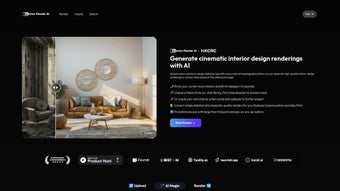

Download InteriorRenderAI – AI‑Powered Interior Design Rendering Tool
Introduction
InteriorRenderAI is reshaping the way designers, homeowners, and hobbyists bring their interior visions to life. This web‑based application combines cutting‑edge artificial intelligence with an intuitive, drag‑and‑drop interface to generate photorealistic renderings in seconds. Whether you upload a simple photograph of a living room, sketch a layout on paper, or describe a desired style in plain language, InteriorRenderAI interprets the input and produces a polished, high‑resolution image that matches your aesthetic preferences.
The platform also supports custom style creation, allowing users to save and reuse unique palettes, material combinations, and lighting schemes for future projects. Because it runs entirely in the cloud, there’s no heavy software to install, and updates are delivered instantly, ensuring you always have the latest AI models and rendering engines at your fingertips. Ideal for professional interior designers looking to accelerate client presentations, real‑estate agents wanting to stage properties virtually, or DIY enthusiasts eager to experiment with color schemes, InteriorRenderAI offers a secure, scalable, and affordable solution for modern interior design challenges.
Its subscription model includes a free tier for casual users and a Pro plan for commercial work, making it adaptable to any budget while maintaining enterprise‑grade security and performance.
Key Features & Benefits
- AI‑Driven Rendering Engine: Generates photorealistic images from photos, sketches, or text prompts in under a minute.
- Natural Language Style Input: Simply type “mid‑century modern with warm wood tones” and the AI translates it into a visual design.
- Custom Style Library: Save personalized style presets for quick reuse across multiple projects.
- Cloud‑Based Processing: No need for powerful local hardware; all heavy lifting is performed on secure servers.
- Real‑Time Editing Tools: Adjust lighting, material finishes, and furniture placement directly in the generated rendering.
- High‑Resolution Export: Download images up to 4K resolution for presentations, marketing material, or client approvals.
- Collaboration Workspace: Share projects with teammates or clients via secure links and collect feedback instantly.
- Version History: Keep track of design iterations and revert to previous versions if needed.
- Cross‑Platform Accessibility: Works on any modern browser, making it available on Windows, macOS, Linux, iOS, and Android devices.
- Secure Data Handling: End‑to‑end encryption protects uploaded images and design data.
Each of these features has been crafted with the end‑user in mind. The AI engine, for example, has been trained on millions of interior design images, allowing it to recognize and accurately reproduce a wide array of styles—from minimalist Scandinavian to opulent Art Deco. The natural language interface eliminates the steep learning curve often associated with 3D rendering software, making the tool accessible to beginners while still offering depth for seasoned designers.
Moreover, the cloud architecture ensures that you always work with the latest algorithmic improvements without the hassle of manual updates or license renewals. The collaborative workspace streamlines feedback loops, enabling clients to comment directly on renderings, which accelerates approval cycles and reduces the number of revision rounds. Finally, the robust security framework, featuring TLS encryption and regular security audits, gives professionals confidence that proprietary design data remains confidential.
Installation, Usage & Compatibility
Getting started with InteriorRenderAI is remarkably straightforward because the application lives entirely in the browser. Follow these steps to begin creating stunning interior renders, and learn about the system requirements that guarantee optimal performance.
- Create an Account: Visit interiorrenderai.com and click “Sign Up.” You can register using an email address or social login (Google, Apple, or Facebook). A verification email will be sent to confirm your identity.
- Select a Subscription Plan: Choose between the free tier (limited daily renders) and the Pro plan (unlimited renders, 4K export, priority processing). All plans include automatic cloud updates.
- Upload Your Input: Click “New Project,” then drag‑and‑drop a photo, upload a scanned sketch, or type a description of the space you want to visualize. Supported formats are JPEG, PNG, and PDF, each up to 20 MB.
- Define Your Style: Use the “Style Prompt” box to enter natural language instructions (e.g., “Cozy farmhouse living room with reclaimed wood and soft linen fabrics”). You may also select from pre‑built style templates to speed up the process.
- Generate the Rendering: Press “Render.” The AI processes the request on secure cloud servers and returns a high‑quality image within 30‑60 seconds. A progress bar keeps you informed of the status.
- Refine & Edit: After the initial render, tweak lighting, swap furniture pieces, or adjust material finishes using the built‑in editor. Changes are applied in real time, and you can preview multiple variations side by side.
- Export & Share: Click “Export” to download the final image in PNG, JPEG, or TIFF format. For collaborative projects, generate a shareable link that grants view‑only or edit permissions to teammates or clients.
- Save to Library: Store the project in your personal library for future reference. The system automatically saves a version history, enabling you to revert to earlier design stages if needed.
- Install as a Progressive Web App (PWA): For quicker access, click the browser’s “Install App” button on the top‑right corner. The PWA behaves like a native program while still leveraging cloud processing.
Because InteriorRenderAI is browser‑based, it runs on any operating system that supports modern web standards. This includes Windows 10/11, macOS 12+, popular Linux distributions, iOS 13+ and Android 9+ devices. The platform is optimized for Chrome, Edge, Firefox, and Safari, ensuring consistent performance across desktop and mobile environments.
For the best experience, we recommend a stable broadband connection (minimum 5 Mbps download) and the latest version of your preferred browser. If you encounter any issues, the Help Center offers step‑by‑step guides, video tutorials, and a community forum where users exchange tips and showcase their projects. The support team responds within 24 hours via live chat or email, and a detailed knowledge base covers topics ranging from troubleshooting render errors to optimizing style prompts.
Supported operating systems: Windows 10/11, macOS 12+, Linux (Ubuntu, Fedora, Debian), iOS 13+, Android 9+. No additional software installation is required beyond a modern web browser.
Pros, Cons & Frequently Asked Questions
Pros
- Instant, high‑quality renders without requiring a powerful GPU.
- Natural language input removes the need for technical 3D modeling skills.
- Cloud‑based updates mean you always have the latest AI improvements.
- Cross‑platform accessibility allows work from any device, anywhere.
- Robust collaboration tools streamline client feedback cycles.
- Secure encryption protects proprietary design data.
- Flexible pricing model accommodates both hobbyists and professional firms.
- Version history enables safe experimentation without losing previous work.
Cons
- Dependent on a stable internet connection; offline work is not possible.
- Free tier limits the number of daily renders, which may be restrictive for heavy users.
- Complex customizations (e.g., precise architectural measurements) may still require traditional CAD software.
- Rendering speed can vary during peak server load times.
- Advanced texture control is limited compared to dedicated 3D modeling suites.
Can I use InteriorRenderAI for commercial projects?
Yes. The Pro subscription grants a commercial license, allowing you to use generated renderings in client presentations, marketing brochures, and sales materials without additional royalties.
What file formats can I export?
InteriorRenderAI supports PNG, JPEG, and TIFF for image exports. High‑resolution TIFF files are available for the Pro plan, ideal for print‑ready materials.
Is my uploaded data stored permanently?
Uploaded images and project files are stored securely for up to 90 days. You can delete any project at any time, and the system automatically removes associated data from our servers after the retention period.
Do I need a powerful computer to run InteriorRenderAI?
No. Because all rendering is performed in the cloud, even modest laptops or tablets can generate high‑quality images as long as they have a reliable internet connection.
How does the AI understand my textual style prompts?
The platform uses a fine‑tuned transformer model that has been trained on millions of interior design descriptions and images. When you type a prompt, the model maps the words to visual attributes such as color palette, material texture, lighting mood, and furniture style, then combines them into a coherent rendering.
Conclusion – Should You Download InteriorRenderAI?
InteriorRenderAI delivers on its promise to democratize high‑end interior visualization. By blending AI‑driven rendering with a user‑friendly web interface, it eliminates many of the barriers that traditionally separate professional designers from casual hobbyists. The ability to generate photorealistic images from a simple photo, sketch, or even a textual description means that brainstorming sessions can move from vague ideas to concrete visual proposals in seconds. While a reliable internet connection is a prerequisite, the benefits of cloud processing—instant updates, cross‑device access, and reduced hardware costs—far outweigh this limitation for most users.
If you’re looking for a secure, fast, and affordable way to explore multiple design concepts without mastering complex 3D software, InteriorRenderAI is a compelling choice. Its free tier offers enough functionality to test the core features, while the Pro plan scales nicely for professional studios that need unlimited renders, higher resolution assets, and collaborative tools. The platform’s strong emphasis on data security, combined with a transparent pricing model, makes it a trustworthy partner for both personal projects and commercial work.
Ready to transform your interior ideas into stunning visual reality? Download InteriorRenderAI now and start creating beautiful, AI‑powered renderings today.



.png)



